Base system
- Prepared the SD card with Raspberry Pi OS (64-bit)
- Enabled Performance Mode for maximum CPU performance
- Switched the graphics system from Wayland to X11
- Installed the required software packages
SOFTWARE / SYSTEM ARCHITECTURE
BrickDOS is based on Raspberry Pi OS. During normal operation, as little of it as possible should ever be visible.
After power-on, the BrickDOS splash screen appears first while Raspberry Pi OS starts in the background. LightDM then handles the automatic login and launches a lightweight OpenBox session. OpenBox autostart opens a full-screen terminal in which a simulated boot sequence with hard-drive detection and a RAM check is shown. After that, the BrickDOS ASCII interface appears.
Die Spiele werden aus dieser Oberfläche über eigene Launch scripts aufgerufen. DOS-Titel laufen mit individuellen Konfigurationen unter DOSBox-X, während unterstützte Adventures direkt über ScummVM gestartet werden. Für den Nutzer bleibt der technische Unterschied zwischen beiden Laufzeitumgebungen dabei weitgehend unsichtbar.
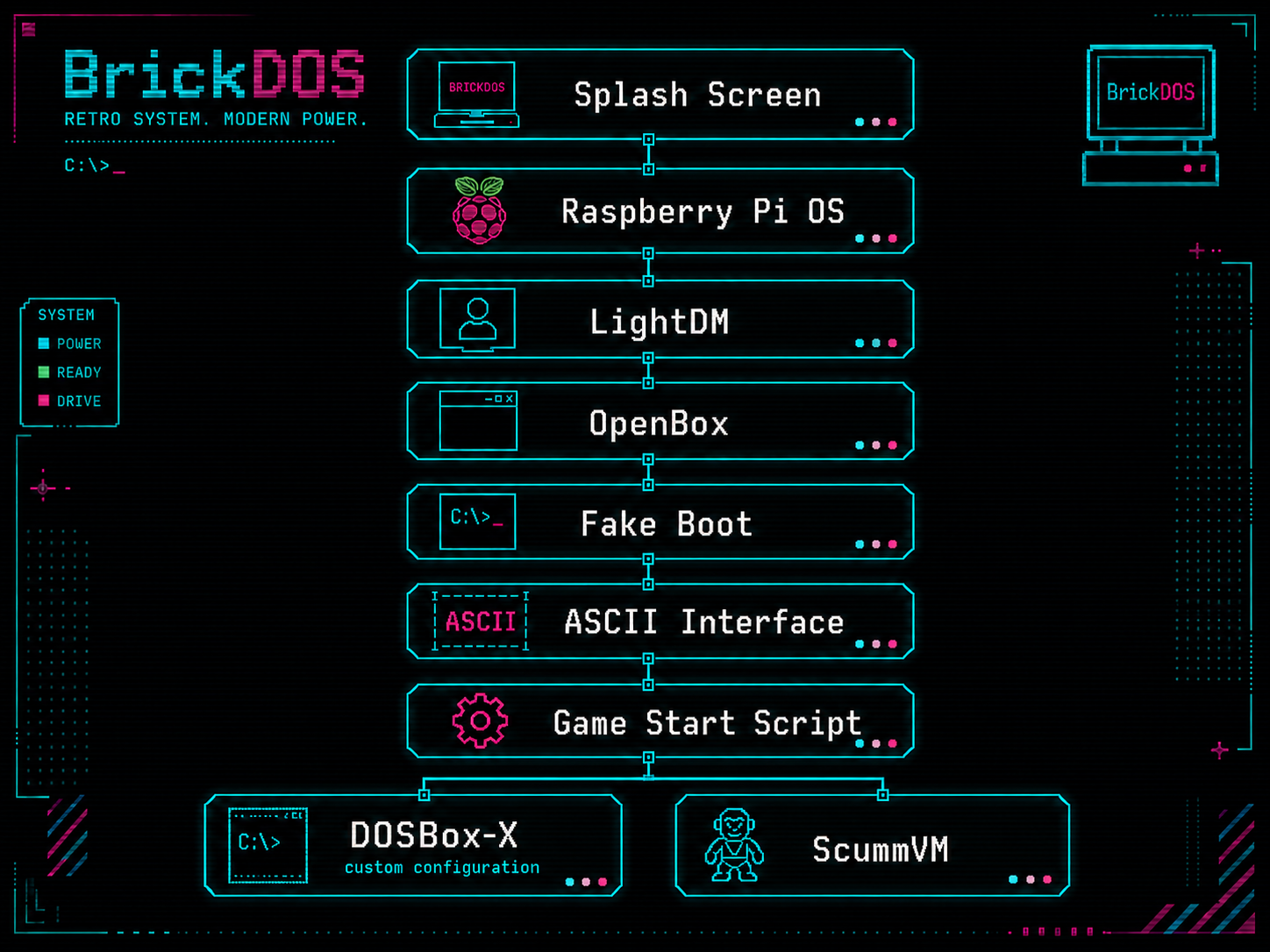
BOOT PROCESS
The visible BrickDOS startup consists of several successive layers. Raspberry Pi OS and the graphical Linux environment serve only as the technical foundation – the user should reach the BrickDOS interface as directly as possible.
Immediately after power-on, the BrickDOS splash screen appears. It replaces the Linux boot messages that would normally be visible and therefore forms the first visible layer of the system.
Technically, the Plymouth splash screen is replaced with the BrickDOS artwork.
As is probably fairly easy to tell, the logo was generated with AI.
Raspberry Pi OS (64-bit) starts in the background and provides the technical foundation of the system. Linux supplies drivers, the file system, USB support and the runtime environment for DOSBox-X and ScummVM.
During normal operation, the operating system itself should not be visible to the user.
LightDM handles login to the graphical system. The BrickDOS user is logged in automatically so that no login screen becomes visible.
OpenBox is launched directly as the session.
OpenBox provides a lightweight X11 environment. A full Linux desktop is not required. The window manager serves only as the technical foundation for the scripts and applications that are later run in full-screen mode.
After OpenBox starts, its autostart configuration is executed. Among other things, the display settings are adjusted and a full-screen terminal is launched. This terminal then starts the BrickDOS fake boot sequence.
Der Fake Boot erzeugt innerhalb des Vollbild-Terminals einen simulierten Bootvorgang. Dieser ist im Stil eines klassischen PCs, inklusive RAM-Check, Festplattenerkennung, etc. Dieser Schritt ist rein für die Display setup zuständig. Der eigentliche Linux-System startup ist zu diesem Zeitpunkt bereits abgeschlossen.
The fake boot takes around ten seconds. It creates a nice effect, but it also means the system takes noticeably longer to become ready for use.
After the simulated boot sequence, the actual BrickDOS interface appears. It consists of classic ASCII menus and serves as the central entry point for game selection. Operation is deliberately simple and keyboard-focused so that the system feels as little as possible like a modern Linux PC.
Windows 98 was originally planned during development, but this approach failed because of problems with the graphical emulation of Windows games and had to be abandoned for the time being. I then decided to use a simple ASCII menu instead. What initially sounds straightforward turned out to be surprisingly challenging, because fitting all games into the menu structure was not easy.
Each game has its own start script. As soon as a game is selected from the ASCII interface, that script is executed. Depending on its configuration, the selected game is then launched in the appropriate way.
DOSBox-X is used for classic DOS games. Each title can have its own configuration for CPU behavior, graphics, sound and other settings.
ScummVM launches supported adventure games directly through the relevant engine. This technical difference remains invisible to the user.
INSTALLATION & SETUP
LESSONS LEARNED
Ursprünglich sollte Windows 98 SE die zentrale sichtbare Oberfläche von BrickDOS werden. Die Idee war, von dort sowohl DOS- als auch Windows-98-Spiele zu starten. Die Emulation erwies sich auf der ARM-Plattform jedoch nicht als zuverlässig genug. Vor allem die grafische Display setup bereitete Probleme. Windows 98 wurde deshalb aus dem finalen Konzept entfernt.
Unfortunately, this also left a whole list of games that did not make it into the final system, even though the hardware itself would probably have been powerful enough.
Some problems were initially interpreted as performance limitations of the Raspberry Pi. Later it became clear that a significant part of them was caused by the classic DOSBox version used before. Switching to DOSBox-X resolved those limitations.
The original reason for switching to DOSBox-X was simply that it supports Windows 98 much better. During the first tests, however, it also became clear that some games ran significantly better with it.
Die größte Herausforderung beim Gesamteindruck ist weniger die eigentliche Emulation als der Übergang zwischen den einzelnen Ebenen. Schon kurz sichtbare Fenster, Desktops oder Konsolenausgaben stören die Illusion eines eigenständigen Retro-Rechners. Der System startup und die Übergänge zwischen Menü und Spiel wurden deshalb so weit wie möglich reduziert und verdeckt.
I was still unable to eliminate every brief flash of a window frame. This is particularly noticeable with ScummVM, where some frames appear for a moment. It does not seem to be caused by the initial launch of ScummVM, but by ScummVM itself during runtime.
Konfigurationen, Spieldateien und Launch scripts werden bewusst getrennt voneinander abgelegt. So existieren eigene Bereiche für DOS und ScummVM, sowie die dazugehörigen Skripte.
This structure makes changes easier and prevents game-specific settings from having to be built directly into the menu interface.
The additional script layer has proven particularly useful. A game can be adjusted independently of the interface without having to modify the central menu code.
At the same time, different emulators can be used even though they are all launched from the same interface from the user's point of view.
Removing Windows 98 as an additional visible layer ultimately made the system not only more stable, but also conceptually cleaner.
For BrickDOS, the rule has therefore become: the less that is visibly happening between power-on, game selection and game launch, the more convincing the overall concept feels.